FixEdenXverse
EdenXverse asks for a code: which one, why it fails, and how to sideload it on Quest 3 and 3S
EdenXverse opens with a single box asking for a code, and that box has generated more questions than the game itself. The confusion has a simple root: there are three ways to get EdenXverse, and each hands you a different code.
By Alex R. · Updated 23 Oct 2026 · 7 min read
The short answer
If you got EdenXverse through VRPorn.com Premium, enter the Login Key from the Download section of its VRPorn.com page; the site's staff have confirmed this several times. Patreon and itch.io copies use an EDEN CODE from linking Patreon on EdenXverse's page instead. A 403 error on the download was a VRPorn.com platform problem in 2025, and a key rejected as invalid can be the login server, so wait and retry. The game itself is a Quest APK: switch on developer mode, install it from a computer, then open it from Unknown Sources in your Library.
Install the VRPorn.com build on a Quest 3 or 3S
- Verify your Meta developer account. Developer mode needs a verified Meta developer account, membership of a developer team, and an age of 18 or over. Meta accepts an SMS-confirmed phone number or a payment method other than PayPal as verification.
- Turn on developer mode in the Meta Horizon app. In the phone app, open your headset, then Headset Settings, then Developer Mode, and switch it on. Meta's current documentation puts the switch in the app, not in the headset.
- Connect with a data cable and allow USB debugging. Use a USB-C cable that carries data. In the headset, turn on MTP Notification under Settings, Developer, then accept the USB debugging prompt with Always allow from this computer.
- Install the APK from the computer. Meta documents one command: adb install, followed by the path to the APK. VRPorn.com's own guide reaches the same result through the Install APK from folder button in SideQuest, which some people find friendlier than a terminal. Pick one. Follow it to the end.
- Open it from Unknown Sources and enter the Login Key. Sideloaded apps do not appear in the main grid. In the headset, open Library and switch to Unknown Sources. Start EdenXverse and type the Login Key from VRPorn.com's Download section.
Search for help with EdenXverse and you land in a thin place. The results are mostly support threads on itch.io where the question sits unanswered, plus the studio's own devlogs from 2023. Nobody has laid the three routes side by side, which is exactly where people go wrong.
Three shops, three codes
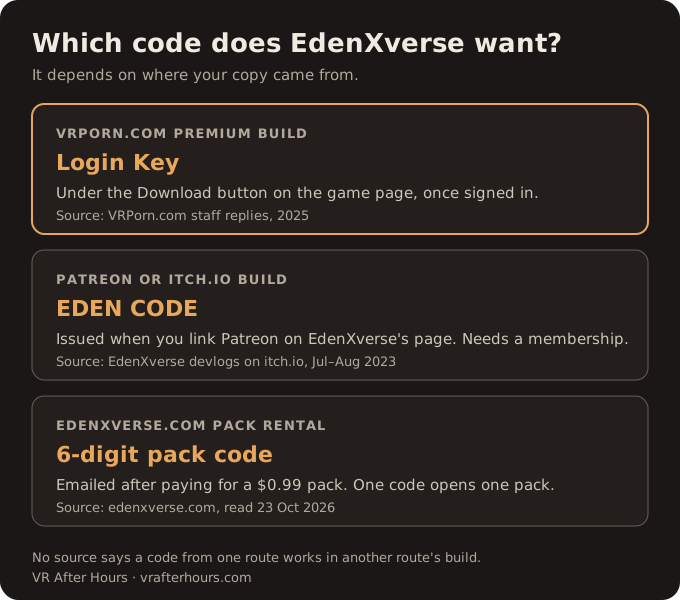
Bought through VRPorn.com Premium
The page describes an exclusive build for Premium members and tells you only to enter your access code at launch, without saying which one. The answer sits in the comments, where the site's community account, VRPornCM, replied to the question repeatedly in 2025: it is the Login Key under the Download button. The Download button itself sends signed-out visitors to the login page, so the key only shows once you are in.
Patreon and itch.io copies
EdenXverse's own download devlog from July 2023 describes a different flow. You link your Patreon account on the studio's page, receive an EDEN CODE, write it down, install the APK and enter the code at launch. A later devlog adds that tier content needs an active membership as well as the code.
Packs rented on edenxverse.com
The studio's site now rents content packs at $0.99 each. Payment brings a six-digit code by email, and one code opens one pack. The site describes downloading packs to a PC and recommends a Quest 2 for the mobile game. How these packs relate to the VRPorn.com build is not explained anywhere we could find.
Nothing we read says a code from one route works in another route's build, and nothing says it does not. Treat them as separate until EdenXverse or VRPorn.com says otherwise.
When the right code still fails
A rejected key and a refused download look like the same wall. They are different walls.
The 403 Forbidden error came first. In 2025 a player reported it when downloading the APK and the code, and VRPorn.com's staff answered that download problems had followed a platform migration and that the team was working on it. That was the site. Not you. If you see a 403 today, sign out and back in, try once more, then report it under the game rather than reinstalling anything.
The "invalid code" message has more than one cause. When a player's Login Key was refused, the staff account tested it, found it working, and suggested trying again because the authentication server may have been unreachable. Two practical points follow. The game checks the key online, so the headset needs a working connection when you enter it. And a code from the wrong route will fail for reasons no retry fixes.
One more failure has no answer at all. In June 2024 a player on itch.io factory-reset their headset, reinstalled, and was told the key was logged in on a separate device. That thread passed 1,500 views without a public reply. It involved an EDEN CODE, so it may not apply to VRPorn.com's Login Key, and no source states a device limit for either. If it happens to you, the store that issued the code is the only place that can reset it.
Getting the APK onto a Quest 3 or 3S
The page header on VRPorn.com calls EdenXverse a PC game and lists headsets from the Apple Vision Pro to Cardboard. Ignore both. What you download is an Android APK for Meta Quest, and the studio's own site talks only about Quest.
There are two documented ways to install it, and they should not be blended.
Meta's documented method
Meta's developer-mode page, updated in August 2026, is the reference for the steps above. It requires a verified developer account and a developer team, and the device-setup page explains verification: an SMS-confirmed phone number or a payment method, PayPal excluded. You must be 18 or over, and a device with restrictions on developer mode will not allow it. Installation is a single adb install command from a computer.
VRPorn.com's SideQuest method
The site's sideloading guide uses SideQuest: create a developer organization, enable developer mode in the phone app, install SideQuest with its Easy Installer, then use its install-from-folder button with the headset connected. It works on the same principle, but parts of it are older. It refers to the Quest mobile app, which Meta now calls the Meta Horizon app, and its screenshots date from late 2023 and early 2025. Where its account steps differ from Meta's page, follow Meta's.
Both end in the same place. Sideloaded apps live in the Library under Unknown Sources, a tab that appears only after your first sideloaded install; if others use the headset, our shared-Quest privacy guide covers locking it.
Two precautions. VRPorn.com publishes no checksum or version number for the APK, so download it only from the game page while signed in, not from a mirror. And EdenXverse told its Patreon players in 2023 to uninstall the old version before installing a new one. That instruction was for the studio's own build; it is a reasonable habit for the VRPorn.com build too, but nobody has confirmed it is required there. Deepthroat Simulator's Quest Edition shows what is at stake: its update guide explains why uninstalling can delete your own files.
Where we land
EdenXverse is worth the trouble for one kind of player: a Quest owner without a gaming PC who wants a menu-driven sandbox. The VRPorn.com build is one of the few in Premium that runs on the headset itself, and its 14 characters, six places and 19 poses make it larger than most.
The install, though, is let down by its paperwork. None of this is hard to fix. VRPorn.com should call the code by one name in both the instructions and the comments, put the Login Key next to the install steps, and label the page as a Quest app rather than a PC game. EdenXverse should answer the reset question in public, since a key tied to a device is precisely what a factory reset breaks. Until then, the chart above and the steps at the top of this page are the shortest path we know.
PC owners have a bigger option from the same studio, the social space LoveXLust VR, and the rest of its catalogue is on our EdenXverse studio page. Everything else on Premium that plays on a Quest with no computer is in our Premium-by-headset guide.
Quick answers
- What is the EdenXverse access code?
- For the VRPorn.com build, it is the Login Key, listed where you download the game. For copies from Patreon or itch.io, it is the EDEN CODE you get by linking Patreon on EdenXverse's page.
- Why does EdenXverse say my code is invalid?
- Check that the code matches where you got the game first. If it does, VRPorn.com's staff suggested retrying later, because the login server may have been unreachable when you tried.
- What does the 403 Forbidden error on the EdenXverse download mean?
- In 2025 VRPorn.com staff tied it to a platform migration and said a fix was underway. Sign out, sign back in and try again. If it persists, report it under the game.
- Can I install EdenXverse on a Quest 3S without a PC?
- Neither guide we read gives a phone-only way to install the APK. Meta mentions a computer-free route for setting up developer mode, but both installation methods we found use a computer.
- My EdenXverse key says it is logged in on a separate device. Can I reset it?
- A player asked this on itch.io in June 2024 after a factory reset, and the thread has no public answer. It concerned an EDEN CODE, not a VRPorn.com Login Key. Contact the store you got the code from.
- Does EdenXverse need a gaming PC?
- No. The headset does the playing; a computer is needed only once, for the install.