GuideDream PlayroomEdenXverseDeepthroat Simulator: Quest Edition
Keeping adult VR private on a shared Quest: separate accounts, App Unlock, and what the browser remembers
A shared headset is a small household with one front door. Adult VR leaves traces in four places on it, and Meta gives you tools for two of them. The other two are down to habit, and one question, whether accounts on the same Quest see each other's browser and sideloaded apps, Meta has never answered in writing.
By Alex R. · Updated 23 Oct 2026 · 7 min read
The short answer
Give yourself your own account on the headset, with its own unlock pattern; Meta allows a primary account plus secondary accounts, each with separate progress. Lock individual apps with App Unlock, which arrived with Quest software v40. In the Quest Browser, sign out of VRPorn.com and clear history after use, knowing that clearing site data also deletes saved scenes in games like Dream Playroom. Sideloaded games get their own Unknown Sources tab in the Library. Whether browser data and sideloaded apps are separated between accounts is not documented, so lock them regardless.
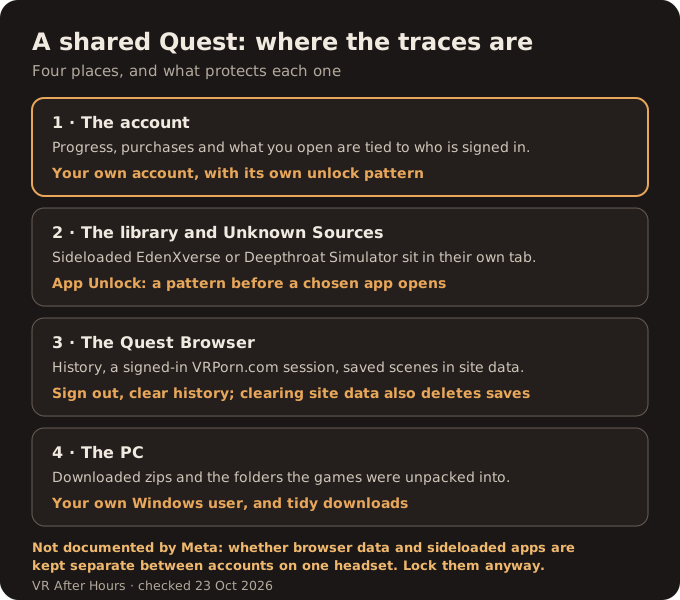
Search for privacy on a shared Quest and you mostly find parental-control advice written for the opposite problem: keeping children out. The adult version is different. You want the headset to stay usable by everyone in the house while one corner of it stays yours. What follows is built from Meta's own developer posts and release notes where they exist, and says so where they do not.
The account comes first
Everything else rests on this. In January 2021 Meta announced multi-user accounts: the headset's primary account can add secondary accounts, up to three at the time, each with its own game progress and achievements. The primary account cannot be changed without a factory reset, so whoever set the headset up holds that role.
Adding an account is done under Settings, then Accounts, according to Android Central's walkthrough. Each secondary account gets its own unlock pattern, and the primary account can set one too. Without a pattern, an account is open to whoever picks up the headset.
App Sharing is the setting to understand before you rely on accounts. It lets secondary accounts launch apps bought by the primary account on that headset, and it can be switched off. Purchases made on a secondary account are never shared back. If the adult content you care about is a store purchase on the primary account, sharing decides who else can open it.
Lock the apps that matter
App Unlock arrived with Quest software v40 in May 2022. Its release notes describe locking individual apps and say the feature extends your existing device unlock pattern. UploadVR's report from the same week describes it differently, with a custom pattern per app. The two accounts disagree on the detail. What both agree on is the result: a chosen app does not open without a pattern.
Sideloaded games are where this matters most. EdenXverse and Deepthroat Simulator: Quest Edition install as APKs and land in a separate Library tab, Unknown Sources, which Meta's developer documentation says shows up only after the first sideloaded install. The tab's existence is itself a small tell. Meta does not document whether App Unlock covers sideloaded apps, or whether a second account on the same headset sees the same Unknown Sources list. Try locking yours, then check from the other account. Updates to those games are manual too, and one of them can cost you your custom characters if done in the wrong order.
The browser remembers more than you think
VRPorn.com's browser games install nothing. That makes them the most discreet option on a shared headset, but not a traceless one. The Quest Browser keeps history like any other browser, and if you stay signed in to VRPorn.com, the next person to open the site is signed in too.
Signing out and clearing history after use deals with both. Clearing site data goes further, and that has a cost. RockHardVR's Dream Playroom stores saved scenes locally, inside the browser's data for that one web address. After VRPorn.com moved to a new domain, RockHardVR told players their saved collections had not survived, and wiping the same storage by hand would remove them just as surely. Choose between privacy and your saved scenes knowingly, because the browser will not ask.
We would like to tell you whether the Quest Browser offers a private window today and whether each account has its own browser history. Meta's Browser help pages and its Browser privacy notice did not render for us, and the third-party answers we found were too old or too thin to repeat. Until that is confirmed, assume history is visible to anyone using your account, and sign out.
Do not forget the PC
PC games on VRPorn.com arrive as zip files and run from folders you unpack, fully, since a half-extracted folder causes one of the Holodexxx launch errors. A Quest connected over Link shows the game, but the files live on the computer. If the PC is shared too, a separate Windows user and a tidy Downloads folder do more for privacy than any headset setting.
Stack the layers
The honest summary is that Meta built its sharing tools for families, and adults get them second-hand. Separate accounts with their own patterns are solid and documented. App Unlock works, though its own maker and the press describe it differently. Everything to do with the browser and sideloaded apps across accounts is undocumented, which is exactly where adult VR on a Quest tends to live.
In practice: your own account with a pattern, App Sharing off if your purchases are private, App Unlock on the sideloaded games, and a signed-out, cleared browser at the end of a session. If you play mostly browser games, the list of what runs without a PC also tells you which titles install nothing at all.
Quick answers
- Can other accounts on my Quest see my apps?
- Store purchases on the primary account can be shared with secondary accounts through App Sharing, which you can switch off. Each account keeps its own progress. Meta does not document whether sideloaded apps are separated per account.
- How do I lock an app on Meta Quest?
- With App Unlock, added in the v40 update of May 2022. It puts a pattern in front of chosen apps. Meta describes it as extending the device unlock pattern; UploadVR reported a separate pattern per app.
- Where do sideloaded apps show up on Quest 3?
- In a separate Library tab called Unknown Sources. Meta's developer documentation notes that the tab appears only after the first sideloaded install.
- Does clearing the Quest Browser delete my game saves?
- For browser games that save locally, yes. RockHardVR's Dream Playroom stores scenes as local site data, so clearing site data removes them.
- Does the Quest Browser have a private mode?
- We could not confirm the current option from an official Meta source, because Meta's Browser help pages did not render for us. Signing out and clearing history works regardless.
- How many accounts can one Quest have?
- When Meta announced multi-user accounts in 2021, a primary account could add up to three secondary accounts. Check your headset's Accounts settings for the current limit.