Virt-A-Mate keeps crashing, runs out of memory, or loads people without hair and clothes: the fixes from the official wiki
Most Virt-A-Mate breakdowns fall into four groups, and the developer's own wiki on hub.virtamate.com has an answer for each. The trouble is that the answers are spread across a FAQ, an error list and two settings pages. We put them in one place, in the order you are likely to need them.
By Alex R. · Updated 28 Oct 2026 · 8 min read
The short answer
If Virt-A-Mate crashes after a few scenes or outfit changes, it is memory: the official wiki calls 32 GB of RAM a good spot and says 16 GB needs a restart now and then; turn on Optimize Memory Usage on Scene Load and on Preset Load under User Preferences, Performance 2. If people load without hair, clothes or skins, a dependency .var is missing: open the Package Manager and use Scan Hub For Missing Packages. If it will not start or forgets your settings, move the VaM folder out of Program Files, Desktop or Users into something like C:\VAM and run the updater's integrity check.
Work through it in this order
- Move the folder somewhere Windows does not guard. The official FAQ says Virt-A-Mate is not installed; it runs from the folder where you ran vam_updater.exe, and that folder must not sit in Program Files, on the Desktop or under Users. Make a plain folder such as C:\VAM, move it there, and run vam_updater.exe to check core integrity.
- Turn on the memory optimizer. Open User Preferences, then the Performance 2 tab, and switch on Optimize Memory Usage on Scene Load and Optimize Memory Usage on Preset Load. The wiki recommends both for 16 GB of RAM or less; the cost is slower reloading of items you use again.
- Lighten the scene before blaming the PC. On the Performance tab, try a lower Quick Quality preset. The wiki names physics as the most demanding feature, keeps Physics Rate on Auto, and says MSAA and Render Scale affect frame rate the most.
- Fill in missing packages. Open the Package Manager, check Missing Packages, then press Scan Hub For Missing Packages. Green entries download from the Hub; red ones are not hosted there and have to be found where the creator published them.
- Read the error log. Errors such as a .var not named creator.name.version, a duplicate package or a damaged zip each have a fix in the wiki's error list. Unity's full log is in AppData\LocalLow\MeshedVR\VaM\output_log.txt.
- Test a clean copy. If nothing helps, the FAQ's last step is to copy vam_updater.exe into a new empty folder, download a fresh VaM there and run it without any add-ons. If even that fails, the problem is the PC or Windows, not your content.
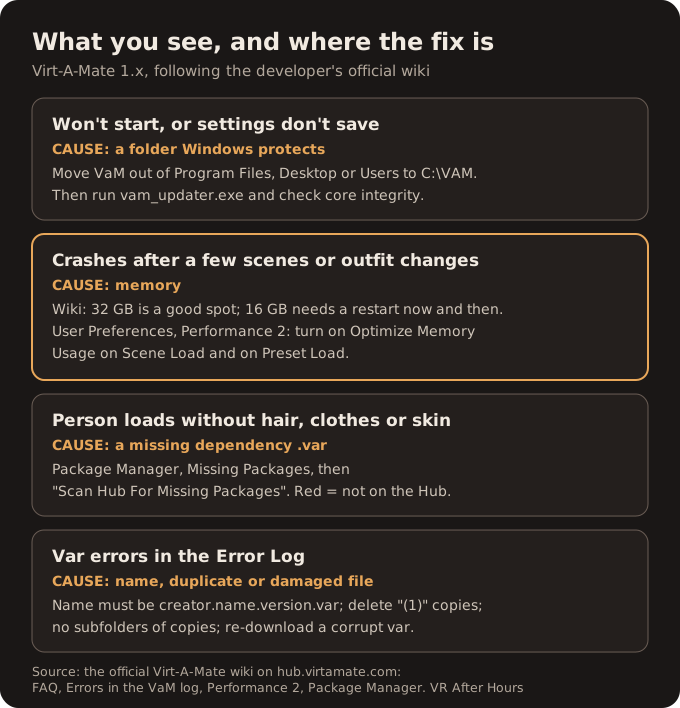
Search for help with a Virt-A-Mate crash and you mostly land in old forum threads and copy-paste sites. The better source sits behind an age check on hub.virtamate.com: an official wiki whose FAQ, error list and settings pages answer most of what players ask. Its pages were last revised in mid-2024 and describe Virt-A-Mate 1.x, the line VRPorn.com Premium ships as version 1.22.0.13.
When it will not start at all
The first answer in the wiki's troubleshooting section is about where the game lives, not what it does. Virt-A-Mate is not installed; it runs from whatever folder you put vam_updater.exe in. If that folder is under Program Files, on the Desktop or inside Users, Windows limits what the game can write, and the result looks like random breakage: settings that will not save, a game that will not open, errors across many packages at once. The fix is a plain folder such as C:\VAM, then a run of the updater to check core integrity.
The same FAQ names one software conflict outright: with Citrix Workspace installed, Virt-A-Mate and other Unity programs will not run. And it gives a last-resort test worth knowing. Copy vam_updater.exe into an empty folder, download a clean Virt-A-Mate and start it with nothing added. If that copy fails too, your content is not the problem.
Crashes after an hour: memory, not a bug
The wiki is unusually blunt here. Under the question of why it crashes after several scenes or lots of appearance changes, the answer opens "VAM loves RAM". It calls 32 GB a good spot for long, intensive sessions, says 16 GB needs a hard reset now and then, and warns that with 8 GB you are asking for it. VR makes it worse.
That is a different bar from the one on VRPorn.com's page, which lists 16 GB as part of the recommended spec. Both can be true: 16 GB runs the game, the wiki's 32 GB keeps it running through an evening of loading scenes.
Before buying memory, use the tool the developer added in version 1.21. The Performance 2 tab in User Preferences shows how much RAM Virt-A-Mate is using and offers two switches, Optimize Memory Usage on Scene Load and on Preset Load. Once enabled, skins, clothing, hair and morphs that are no longer in use are unloaded when you load something new. The developer suggests both for machines with 16 GB or less and is honest about the cost: anything you go back to loads more slowly. A Trigger Memory Optimization Now button does the same purge on demand.
The page file is part of the same story. When Virt-A-Mate goes past your physical memory, the wiki says, it spills into virtual memory on the drive. Windows can only hand out as much memory as RAM plus the page file allow, as Microsoft's sizing guidance explains, and by default it grows the page file itself. If you have switched the page file off or capped it small to save space, that is worth undoing before anything else. Neither source gives a number for Virt-A-Mate specifically, so we do not either.
Low frame rate is a separate problem
A crash and a slideshow have different causes. For frame rate, the Performance tab is where to look. Its Quick Quality presets run from Ultra Low to Max; Ultra and Max raise Render Scale to 1.5 and 2.0, which multiplies the pixels the card has to draw. The wiki calls physics the most demanding feature in Virt-A-Mate 1.x, advises leaving Physics Rate on Auto, and says MSAA can greatly affect frame rate, with 2X or 4X fine for most scenes. If physics starts running in slow motion, the Physics Update Cap is the setting that trades accuracy for speed.
People without hair, clothes or skin
This one looks like a broken scene and almost never is. A scene in Virt-A-Mate is assembled from .var packages, and most scenes depend on packages by other creators. If one is missing, the person loads bald, naked of the outfit you expected, or without textures. The FAQ's answer: open the Hub Browse and scan for missing referenced packages.
The Package Manager shows the same thing more precisely. Its list of missing packages highlights any .var that references something you do not have, and the Hub scan button beside it turns that into a download list. Green entries are on the Hub and download with a click. Red ones are not hosted there, so you have to find them where the creator published them. Yellow means you have a newer version than the one requested, which usually works.
A word on downloading scenes from elsewhere. Packages with plugins ask before their code runs, and the Security tab keeps plugins, network access and web content off until you opt in. The Premium page's own security notice asks every player to be on 1.22.0.13 and to load content only from sources they trust. Missing-package hunts are exactly when people relax that rule.
Decoding the error log
The wiki's list of log errors turns cryptic messages into fixes. Four come up most:
| Message in the log | What it means | Fix |
|---|---|---|
| not named with convention creator.name.version | The file name lacks a version, often a Windows "(1)" copy | Rename it, or delete the copy and keep the original |
| Duplicate package … Cannot register | The same .var exists twice | Remove the copy; subfolders in AddonPackages are the usual source |
| Missing addon package … depends on | A dependency is missing | Download it from the Hub, or from the creator if it is not hosted there |
| Cannot find central directory / Wrong local header signature | The .var is damaged | Download it again; if many fail at once, check folder permissions |
Not every error reaches the in-game log. Unity's fuller record sits in AppData\LocalLow\MeshedVR\VaM\output_log.txt under your Windows user.
Gaps in the official answers
The wiki covers Virt-A-Mate 1.x as a whole. The Premium copy is the Entertainer build, and we could not confirm which of the wiki's tools, the Hub browser among them, behave identically there. Nor does the wiki say how much memory a typical scene uses; its Report Usage examples are screenshots without figures we could read. If your case does not match anything above, the Hub's help forum is where the developer's community answers.
Where the blame lies
Virt-A-Mate's reputation for crashing is mostly a reputation for needing memory and tidy folders. The developer documents both plainly; the problem is that the documentation sits behind an age gate on a forum, while the Premium download page says nothing about it beyond 16 GB. For a Premium member, the two memory switches and a clean C:\VAM folder will fix more crashes than any driver update.
Setting up the Premium copy for the first time? Our Virt-A-Mate install guide covers the updater and the code, the vamX setup guide covers the add-on that runs on top, and our Virt-A-Mate page has the rest.
Quick answers
- Why does Virt-A-Mate crash after loading a few scenes?
- Memory. The official wiki says Virt-A-Mate loves RAM: 32 GB is a good spot for long sessions, 16 GB needs a restart once in a while, and 8 GB is asking for crashes. The memory optimizer in Performance 2 reduces it.
- How much RAM does Virt-A-Mate need?
- VRPorn.com's page recommends 16 GB as part of the recommended spec. The developer's wiki treats 16 GB as workable with occasional restarts and 32 GB as comfortable for long VR sessions.
- Why is the person in my scene missing hair or clothes?
- The scene uses a .var package you do not have. In the Package Manager, use Scan Hub For Missing Packages and download what it lists in green.
- Where do I put .var files in Virt-A-Mate?
- Always in the AddonPackages folder inside your VaM folder, without subfolders of copies. The wiki traces duplicate-package errors to subfolders.
- What does 'is not named with convention creator.name.version' mean?
- The .var file name lacks its version number, often because Windows added (1) to a second download. Rename it to the creator.name.version.var pattern or delete the copy.
- Where is the Virt-A-Mate error log?
- Errors show in the in-game Error Log. Unity's fuller log is at C:\Users\<you>\AppData\LocalLow\MeshedVR\VaM\output_log.txt.