Setting up vamX: which copy you have, what to install first, and why the vamX menu sometimes never appears
Most vamX setup trouble starts with a naming problem. The same word covers a standalone bundle with its own updater, a plugin package you add to Virt-A-Mate, and the older build on VRPorn.com Premium, and each one starts and updates differently.
By Alex R. · Updated 27 Oct 2026 · 7 min read
The short answer
vamX is a game layer that runs inside Virt-A-Mate, so Virt-A-Mate comes first. The developer's itch.io and Steam bundle already includes it and installs into one folder with VaMX_Updater.exe. If you add vamX to a Virt-A-Mate you already have, download it from the in-game Hub, allow its plugins when asked, and press “Add vamX” in any scene where its menus are missing. All versions need a Windows PC with at least 16 GB of RAM; on a Quest you play through Link or Air Link.
From an empty PC to the vamX menu
- Work out which vamX you have. A folder with VaMX_Updater.exe is the developer's bundle, with Virt-A-Mate inside. A vamX download from a Virt-A-Mate Hub page is an add-on. The VRPorn.com Premium listing is version 1.21 and sits on top of the Premium Virt-A-Mate.
- Make room before installing. The developer's installer downloads about 23 GB and asks for 30 GB free; plan on 80 GB once textures are cached and community content arrives. A fast external SSD works, the developer says.
- Install and start Virt-A-Mate. For the Premium copy, run the updater from the Virt-A-Mate zip, start the game and enter the code from the text file in that zip. Start in VR with the OpenVR launcher in the game folder.
- Add vamX and allow its plugins. Premium members install the vamX 1.21 download next, following the readme inside it, as the VRPorn.com listing instructs. Add-on users search the in-game Hub for vamX instead. Either way, allow the vamX plugins when the game asks; Virt-A-Mate keeps plugins off until you do.
- Press Add vamX in your own scenes. Scenes you load from elsewhere start without the vamX menus. The “Add vamX” button on the right of the standard menu switches them on.
- Run the built-in tutorial. In VR, open Scene, then Help, then the main tutorial. It covers selection with the A button, the trigger that opens the menu, and the possess options.
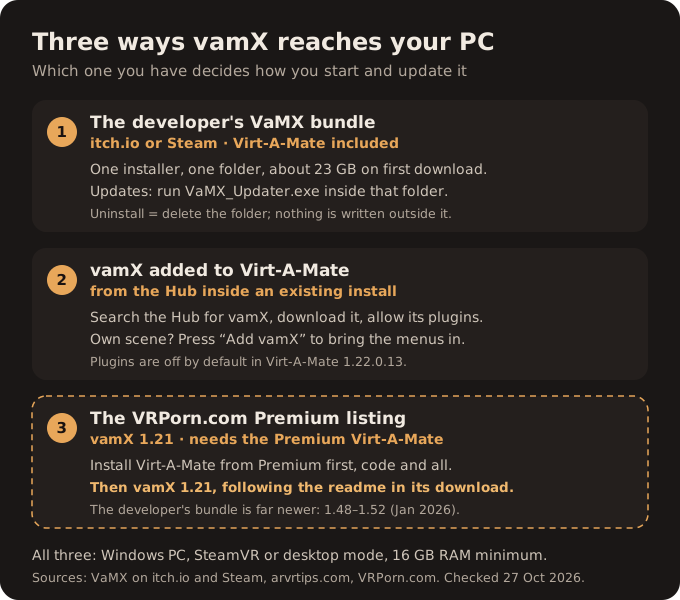
One name, three packages
Ask on a forum how to install vamX and you will get correct answers that contradict each other. That happens because they describe different things.
The developer sells a bundle called VaMX on itch.io and on Steam. It contains Virt-A-Mate and the vamX layer together. In a reply on its itch.io forum the developer calls it a single installer and says it writes nothing outside its own folder, so removing it means deleting that folder. Updates come from VaMX_Updater.exe in the same folder; the January 2026 devlog tells buyers to run it to see the change log and move to 1.48–1.52.
The second package is vamX as an add-on for a Virt-A-Mate you already own. The arvrtips.com setup guide describes it: open the Hub from Virt-A-Mate's main menu, search for vamX, download everything, and choose “Always Allow” when the game asks about loading its plugins.
The third is the VRPorn.com Premium listing. Its page offers members vamX 1.21 and calls it a content pack and sex game for Virt-A-Mate, which settles the question of order.
Three sentences on the listing
That is the whole set-up note. Download Virt-A-Mate from its own Premium page before installing vamX, it says, adding that both need Windows and a strong graphics card. For everything else, read the readme in the vamX download.
That confirms the order and stops there. The page does not describe the file: whether 1.21 is an installer, a package you drop into the Virt-A-Mate folder, or something with a code of its own. The readme sits behind the membership. We have not read it, and we are not going to fill that gap with a folder path from another version. Follow the readme for the copy step; everything around it, from the plugin prompt to the “Add vamX” button, works the same whichever package you end up with. The listing also has four comments that did not display for us, so any Premium-specific snag a player reported there is one we have not seen.
Virt-A-Mate comes first
On Premium, Virt-A-Mate arrives as a zip holding its updater plus a code, as our Virt-A-Mate install fix explains. The arvrtips.com guide adds the launch files the updater leaves behind: a config file for graphics, a desktop launcher, and an OpenVR launcher for headsets. The code goes in through the key icon at the bottom of the first screen.
The version matters for vamX. VRPorn.com asks everyone to move Virt-A-Mate to 1.22.0.13, and in that build plugins stay disabled until you allow them. vamX is built from plugins. Refuse the prompt, or miss it, and vamX loads as a set of files that do nothing.
A scene with no vamX menus
The most common report on the developer's Steam forum is a scene that loads without the movement and plugin menus. A player answered it in December 2022 and the fix has not changed: press “Add vamX”, on the right-hand side of Virt-A-Mate's usual menu. That applies to any scene built outside vamX, including the free community scenes the developer itself points people to. The developer used the same button in another thread as the quick fix for a character whose look did not come across.
One reply on the itch.io forum suggests that a missing Tutorials section means a damaged key file and a reinstall into a new folder. That comes from a single post whose author the page does not show, so treat it as a last resort.
The developer's answer to a confused newcomer is worth reading before you touch the scene editor at all. Possession, hand collision and clothing are all reachable from vamX's own menus, and the VR tutorial sits under the Scene menu, in Help.
Controls, room bounds and crashes
In the same Steam thread the developer cleared up the controls that confuse new players. The A button selects; the trigger only opens and closes the menu. SteamVR's room boundary is not something vamX can hide, so you switch it off in SteamVR yourself.
Memory is the harder limit, and our Virt-A-Mate crash fix covers the memory settings that apply to vamX too. In December 2022 the developer listed frequent crashes on 16 GB machines as the first thing to fix. Its current recommendation, as our vamX page records, is 32 GB with an RTX 2070. Sixteen is the floor the developer repeated to an RTX 4080 laptop owner in 2024, not a comfortable target.
Adding trackers
vamX works with SteamVR trackers, and a forum moderator's walkthrough is the clearest description we found. Pair the trackers in SteamVR first. In an empty scene, add a person to be your avatar and possess it, aligning the head and then the wrists. Attach the hip tracker to the hip control and the foot trackers to the two foot controls. Add a partner, press “Add vamX”, clear the plugins with the option that enables vamX movement, and untick the setting that poses your avatar along with the partner. Save the scene so you do this once.
The walkthrough is from 2022 and was written on a Valve Index. Control names come from Virt-A-Mate itself and are unlikely to have moved, but menu labels in vamX may have.
On a Quest
Nothing here runs on the headset alone. vamX lives in a Windows program, so a Quest is a display for the PC; our comparison of the four ways to stream a PC game to a Quest covers the choice. Trackers add another layer, since they need SteamVR to see them.
What we would change
Two problems sit behind most setup complaints, and only one of them belongs to the player. Allowing plugins and pressing “Add vamX” are a one-time lesson. The naming is not: a bundle, a Hub add-on and a Premium listing all called vamX, with no page that says which one you are looking at. VRPorn.com could fix its part with two lines on the listing, saying what the 1.21 file is and where it goes, and that it is far behind the developer's build. If you mainly want the newest features, the developer's own bundle is where they land, as the vamX page sets out. If you want to see whether the format suits you, the Premium copy costs nothing extra, provided Virt-A-Mate is already running.
We will add the readme's steps here once we can read them.
Quick answers
- Do I need Virt-A-Mate to play vamX?
- Yes. vamX runs inside Virt-A-Mate. The developer's itch.io and Steam bundle includes both; on VRPorn.com Premium they are listed separately.
- Why is the vamX menu missing in my scene?
- Scenes made outside vamX load without its plugins. Press “Add vamX” on the right side of the standard Virt-A-Mate menu, and allow the plugins if the game asks.
- How do I update vamX?
- For the developer's bundle, run VaMX_Updater.exe from the VaMX folder; it shows the change log first. The Premium copy is listed as 1.21 and changes only when VRPorn.com publishes a new file.
- Does vamX support full-body trackers?
- Yes, through SteamVR. Pair the trackers in SteamVR, possess your avatar, then attach a hip tracker to the hip control and foot trackers to the foot controls.
- How much disk space does vamX need?
- About 23 GB for the developer's download, 30 GB free as a minimum, and around 80 GB with cached textures and extra content.
- Why does vamX crash on my 16 GB PC?
- The developer named crashes on 16 GB machines as a known problem in December 2022 and has since recommended 32 GB. Close other programs, keep scenes to two characters, and lower texture settings.