GuideVirt-A-MateHolodexxx: The ClubComeCloserBraindanceLove Vibe: AriaDJ Lusty Beats
Playing VRPorn.com's PC games on a Quest 3 or 3S: Link, Air Link, Virtual Desktop or Steam Link
A Quest cannot open a Windows game, and VRPorn.com's comment threads are full of people who found that out after the download finished. The headset can still play them, as a screen and controllers for a PC that does the work. There are four ways to connect the two, and our games do not treat them equally.
By Alex R. · Updated 23 Oct 2026 · 9 min read
The short answer
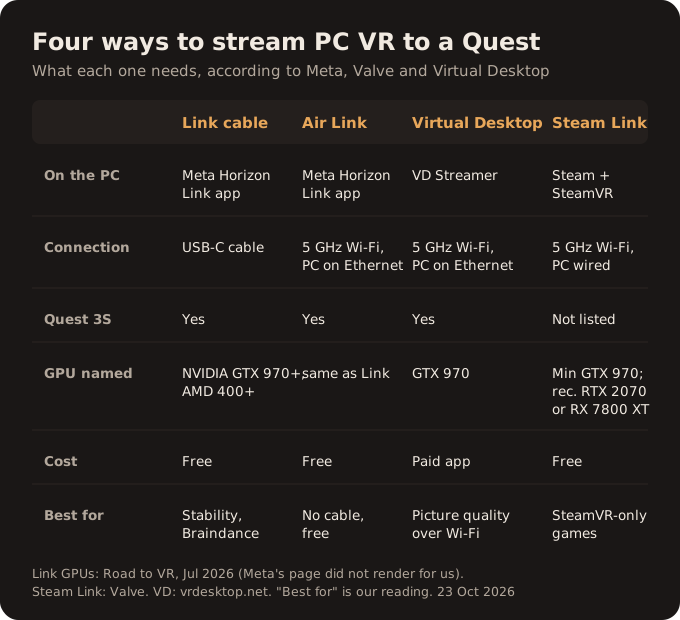
Install the game on a Windows PC, then stream it to the Quest. A USB-C cable with Meta Horizon Link is the most dependable start and is free. Air Link drops the cable, with the PC on Ethernet and the headset on 5 GHz Wi-Fi. Virtual Desktop is a paid app that many players prefer over Wi-Fi. Steam Link is Valve's free wireless route, but Valve's list names the Quest 2, 3 and Pro, not the 3S. Several of our games, the Holodexxx titles, ComeCloser and Love Vibe: Aria among them, expect SteamVR to be running before you start them.
The PC does the work, the Quest is the screen
Sixteen titles from VRPorn.com in our catalogue are Windows programs. Our headset guide lists them. None will run on the Quest itself, and a Quest 3S owner who downloads Adult VR Game Room or Virt-A-Mate to the headset gets a file it cannot open. What a Quest can do is act as the display and controllers for a PC. The game renders on the computer, the picture travels to the headset, and your movements travel back.
That makes two things matter more than the headset: the graphics card, and the link between the two. The card sets the ceiling. Road to VR's summary of Meta's Link requirements, published in July 2026, puts the floor at an NVIDIA GTX 970 or an AMD card from the 400 series, with a few exceptions such as the GTX 1060 3GB and the GTX 1650. Meta's own requirements page loaded without its text when we tried, so check it if your card is borderline. The heavier games ask for much more: Virt-A-Mate's page recommends a GTX 1080 Ti, and its developer wants plenty of RAM as well, as our Virt-A-Mate crash fix explains.
Start with a cable and Meta Horizon Link
Meta's own software, Meta Horizon Link, runs on the PC and connects the headset over USB-C. It is free, and it has the fewest moving parts, which is why we would start here even if you plan to go wireless later. If the game works over a cable, any later problem with Wi-Fi is a Wi-Fi problem.
It also matters for one game in particular. Skarredghost's Braindance review found Link from a PC gave the best picture with passthrough, so the performer can stand in your real room at full PC quality. The catch: Meta documents Passthrough over Link as a developer feature. You turn on Developer Runtime Features in the Link app's Beta settings, then the passthrough switch, and you must be signed in with a developer account in both the app and the headset. Meta also asks for a cable that tests at 2 Gbps or more in the app's USB test. If Premium unlocked only the Braindance demo, that is an account problem, covered in our Braindance fix.
Air Link: the same software, minus the cable
Air Link is Meta Horizon Link over Wi-Fi. It costs nothing extra but asks more of your network. The advice in Road to VR's guide is specific. Put the PC on Ethernet. Use a Wi-Fi 5 or Wi-Fi 6/6E router with the headset on its 5 GHz band. Keep the router in the same room, ideally in line of sight and a metre off the floor. Avoid mesh systems and extenders.
If that describes your home, Air Link is the sensible second step after a cable. If it does not, the next route has the same network demands, so buying it will not fix a bad router.
Virtual Desktop, the paid alternative
Virtual Desktop is a paid app on the headset, listed at $20 in Road to VR's chart of paid Quest apps in July 2023, paired with a free Streamer on the PC. Check the store for today's price. Its website lists the Quest 3 and 3S among supported headsets, asks for Windows 10 or 11 and a VR-ready PC at GTX 970 level, and gives the same network advice in its own words: wired PC, 5 GHz router, and no VPN in the way. Games launch from the app's Games tab, which covers SteamVR and Oculus titles.
Players on our game pages report it working for Holodexxx Home, where one called it the best of the options, and for Meet Marley and Riley Reid Redux. One DJ Lusty Beats player could not accept the game's licence screen through it. That is a single report, but it is the kind of quirk a cable test would rule out quickly.
Steam Link, straight into SteamVR
Valve's Steam Link for VR headsets connects the headset straight to SteamVR, with no Meta software on the PC. It is free. Valve asks for Windows 10 or later, 5 GHz Wi-Fi with the PC wired, an NVIDIA GTX 970 as the minimum and an RTX 2070 or Radeon RX 7800 XT as the recommendation, plus a recent headset firmware.
Two limits matter here. The Quest 3S is not on Valve's list, which names the Quest 2, 3 and Pro. And our games are not Steam games: they are downloads from VRPorn.com that you start yourself on the PC. Valve's post says nothing about launching programs outside the Steam library. Some Virt-A-Mate players report using Steam Link by starting the game's OpenVR executable, so it can work, but it is the least documented route for this catalogue.
Which games want what
Most of the PC games do not care which route you use, as long as a VR runtime is running. A few are pickier, and their pages or developers say so.
| Game | What it expects | Source |
|---|---|---|
| Holodexxx titles | SteamVR started before the game; without it, Home opens in 2D | Holodexxx developers |
| ComeCloser | SteamVR only; launch it with SteamVR running | Game page |
| Love Vibe: Aria | SteamVR required; one Quest 3 owner found most buttons unresponsive | Game page, player |
| Mirage | SteamVR | Game page |
| Braindance | OpenXR through Link, SteamVR or Virtual Desktop; best with Link | Game page, Skarredghost |
| Virt-A-Mate and vamX | Link or Air Link; Steam Link reported via the OpenVR executable | Game page, players |
| LoveXLust VR, VR Naughty | PC VR over Link, the only route their pages name | Game pages |
When the picture appears on the monitor and not in the headset, the order is almost always the cause. Connect the headset first, start SteamVR if the game uses it, then start the game. Our Holodexxx launch fix goes further for the crash cases, and vamX, with its plugin prompt and optional SteamVR trackers, has its own setup page.
Gaps in the documentation
Three gaps are worth stating plainly. Meta's help pages on Link setup and PC requirements came back empty for us, so the GPU list above comes from Road to VR's reading of them. Valve has not said whether Steam Link supports the Quest 3S. And no developer in this catalogue has published which streaming route it tests with; the game-by-game table is built from game pages and player reports.
Our recommendation
Start with a USB-C cable and Meta Horizon Link, get one game working, and only then go wireless. Air Link is free and fine on a good network. Virtual Desktop is worth paying for if Air Link stutters on yours. Steam Link is the one we would try last for these games, because they live outside Steam and the 3S is not on Valve's list.
Still deciding whether a PC is worth it at all? Our guide to Premium games by headset shows 28 titles that need none.
Quick answers
- Can I play VRPorn PC games on a Quest 3 without a PC?
- No. A Windows PC runs the game and the Quest displays it. Twenty-eight titles that need no computer are listed in our headset guide.
- Which is better for adult VR games, Link or Virtual Desktop?
- Start with a Link cable: it is free and has the fewest variables. Move to Air Link or Virtual Desktop when the wired setup works and you want to lose the cable. Players on our game pages report success with all three.
- Does Steam Link work on the Quest 3S?
- Valve's announcement lists the Quest 2, Quest 3 and Quest Pro, plus several Pico and HTC headsets. The 3S is not on it, so treat it as unconfirmed.
- What PC do I need to stream VR to a Quest?
- As a floor, an NVIDIA GTX 970-class card on Windows 10 or later; Meta's Link also supports AMD cards from the 400 series. Valve recommends an RTX 2070 or RX 7800 XT for Steam Link, and games like Virt-A-Mate ask for more.
- Why does my PC VR game open on the monitor instead of the headset?
- Usually the VR runtime was not running when the game started. Connect the headset, start SteamVR, then launch the game; Holodexxx's developers give this order for their games.
- Can I use passthrough in Braindance over Link?
- Skarredghost's review found Link gave the best result with passthrough. Meta documents Passthrough over Link as a developer feature in the Link app's Beta settings, so expect it to require a developer account.