GuideDominatrix Simulator: ThresholdDeepthroat Simulator (PC VR)Deepthroat Simulator: Quest EditionvamXAdult VR Game RoomVirt-A-Mate
Adult VR games that work with Lovense and The Handy, and which build you need for it
Five of the 47 games we cover have a developer saying, somewhere, that a Lovense toy or The Handy will follow what happens in the headset. That somewhere is usually a devlog or a reply in the comments, almost never the store page. And for two of the five, the version that comes with VRPorn.com Premium was built before the toy support arrived.
By Alex R. · Updated 3 Nov 2026 · 9 min read
The short answer
With a PC, three games are confirmed by their developers: Dominatrix Simulator (Lovense through the Lovense Remote app, other brands through Intiface Central), Deepthroat Simulator for Windows (Intiface, built with The Handy) and vamX (Lovense, The Handy and OSR strokers). Adult VR Game Room has The Handy and Lovense too, but only in the developer's builds from 0.6.0 on; Premium has 0.5.2. For a standalone Quest, nothing is confirmed: Squircle Games has said toy support is desktop only, and a newer change list mentions it without naming the build.
Premium builds with toy support
Dominatrix Simulator 2.11.0 and Deepthroat Simulator 1.641 for PC, both in Premium, are builds made after their developers added toy support. Adult VR Game Room's Premium build is older than its toy support.
Partner link, we may earn a commission.
The short list, and where it comes from
We went through every game in our catalogue looking for a device name: Lovense, The Handy, Buttplug.io, Intiface, OSR. Most pages mention none. Where a page says "toys", it nearly always means objects inside the game. EdenXverse counts 12 of them, and Adult VR Game Room lets you drop toys into a room alongside furniture and lights. Neither of those is a promise about hardware.
Five games do name real devices, and in each case the statement comes from the developer, usually in a devlog or a reply under the game. Here is what each one says, and whether the build Premium offers is new enough to have it.
| Game | Devices the developer names | How it connects | Premium build |
|---|---|---|---|
| Dominatrix Simulator | Lovense, anything Buttplug.io supports | Lovense Remote (Game Mode) or Intiface Central | 2.11.0, has it |
| Deepthroat Simulator (Windows) | Buttplug.io devices, built with The Handy; Lovense per a developer reply | Intiface Central | 1.641, has it |
| vamX | Lovense, The Handy, OSR strokers, Solace Pro | Not described in what we could read | 1.21, unclear |
| Adult VR Game Room | The Handy (0.6.0), Lovense (0.6.4) | Not described | 0.5.2, has neither |
| Deepthroat Simulator: Quest Edition | Conflicting statements | Not described | 1.66, unconfirmed |
Virt-A-Mate on its own is a sandbox; the toy sync people talk about comes from vamX, which runs on top of it. XPlayVR's studio profile on VRPorn.com mentions "haptic toys", while its three game pages name no device at all, as we noted in our XPlayVR chronicle.
Dominatrix Simulator: the clearest instructions
deviant.tech is the only developer here that wrote its setup down step by step. Toy support arrived in version 2.9 in March 2024, and the 2.10.0 devlog from May 2024 describes two ways in, both from a bookmark in the in-game journal.
The Lovense route goes through the phone. Connect the toy in Lovense Remote as usual, open Discover, choose Game Mode and switch on Enable LAN, then pick the app in the journal and tap the toy to test it. The developer suggests this for PCs without Bluetooth, because the game talks to the phone over your home network.
The Buttplug.io route uses the PC's own Bluetooth, built in or a dongle. In 2.10.0 the game connected directly, and the devlog told players to close Intiface Central first. Version 2.11.0 reversed that: the update notes move Buttplug.io support into Intiface Central, which now has to be installed, and the game keeps searching when it finds no toy instead of giving up. Premium offers 2.11.0, so follow the newer instruction. The older one is the reason forum advice on this game contradicts itself.
The developer's help page sums it up as "any toy that works with buttplug.io or Lovense". It never names The Handy, and players on itch.io keep asking how to connect one. On paper, a Handy that works in Intiface should show up, but nobody from the studio has confirmed it, so we would not buy a Handy for this game.
Deepthroat Simulator: one build has it, the other probably not
Squircle Games added Buttplug.io support to the Windows game in June 2022 as a beta, and thanked The Handy's team for the unit they developed it with. The desktop page still says "We fully support the buttplug.io system", and when a buyer asked how to connect a toy, the developer pointed to Intiface. The Premium build, 1.641, is three years newer than that feature.
The Quest Edition is where it gets murky. Under the Quest Edition's itch.io page, two players asked about toys, and the developer answered both times that only the desktop version has toy support ("Lovense is supported! But only on our desktop version of the game."). Those replies carry no date. Then, around 28 October 2026, the studio left a list of changes in the comments on the Quest Edition's VRPorn.com page, which we covered in our 1.66 news item, and one line promises better Intiface and Handy sync with automatic reconnection. The same list also fixes 2D mouse controls, which points to a list written for both versions at once.
We cannot settle it. Nothing in the Quest Edition's own description or in its 1.63 notes mentions toys, and the explicit statements we found say desktop only. Until Squircle Games says otherwise, treat toy sync on the standalone Quest build as unconfirmed.
vamX: the longest device list
vamX names more hardware than anything else here. Its itch.io listing, as we read it on 27 October, lists Lovense toys, The Handy, OSR strokers from the SR1 to the SR6, the Lovense Solace Pro and Fleshlight tracking. The devlog of 6 July 2025 announced compatibility with "the Lovense Solace Pro & All Lovense Bluetooth Toys".
What we could not find is how the connection works: no app, no pairing steps in the parts we could read, and the store page itself would not open on 3 November. The bigger question is the build. Premium lists vamX 1.21, while the developer's bundle is at 1.48 to 1.52 after the January 2026 release. The Lovense work from July 2025 cannot be in 1.21. Whether that old build drives a Handy or an OSR, we found no statement either way. If toys are why you want vamX, the itch.io bundle is the version the developer is describing. Our vamX setup fix covers the Premium install itself.
Adult VR Game Room: real support, wrong build
Here the dates are clear. The developer's 0.6.0 update of 31 October 2023 says "The Handy toy is now fully supported". The 0.6.4 update in 2025 added Lovense and made the Handy sync "better, smoother, more responsive". The free demo page lists both in its feature list.
Premium members get the 0.5.2 tester build, which predates all of it. So a Premium download has no toy support, and the developer's $49 edition on itch.io or a Patreon pledge does. Neither devlog explains how the game finds the device, so whether it uses Bluetooth or a Handy connection key is an open question. The download problems with the Premium build have their own fix.
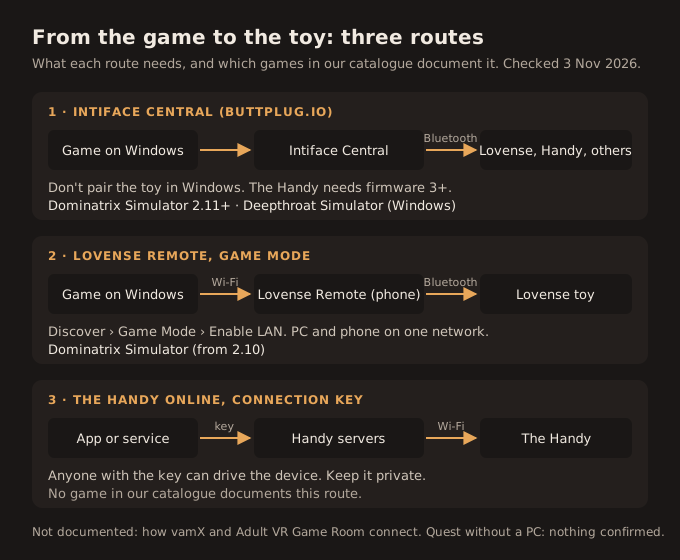
The three routes from game to toy
Every game above uses one of three paths, and knowing which one helps more than any game-specific tip.
Intiface Central over Bluetooth
Intiface Central is the free app of the Buttplug.io project. Its quickstart has you start the engine, scan, and let the game connect to it. Two warnings from that page save most of the trouble: Bluetooth LE is the preferred link for every brand, and you should not pair the toy in Windows' Bluetooth settings, which can stop Intiface from finding it. Lovense owners without Bluetooth can route through the Lovense Connect app or Lovense's USB dongle, but Intiface calls the first finicky and the second much slower. For The Handy, Intiface's brand page asks for firmware 3 or newer and pairs over Bluetooth: power on, wait for green, hold the Wi-Fi button until the light turns blue while Intiface is scanning.
Lovense Remote's Game Mode
The phone app runs a small local service that games call over your home network. The Buttplug.io project's notes on Lovense Game Mode describe it: Game Mode on in the app, game and phone on the same network.
The Handy online, with a connection key
The Handy is built as a Wi-Fi device. Its maker's help pages describe a connection key, shown in the Handy app, that online services use to drive it. The same page warns that the key "allows anyone to control your device remotely" if they know it. For the Handy 2, the connection guide says the Wi-Fi and Bluetooth boot mode adds 20 to 100 ms of delay and recommends plain Wi-Fi. None of the five games documents using this route. We list it because the key is easy to share by accident: treat it like a password.
If the toy never appears
The player reports we found point to the same causes, in roughly this order.
- Two apps want the same toy. A toy held by Lovense Remote is not free for Intiface, and the reverse. deviant.tech's own steps start with closing whatever else usually controls it.
- The phone grabs it first. Under the Dominatrix Simulator devlog, one player who saw no toys fixed it by disconnecting the toy in the Lovense app, turning off the phone's Bluetooth and letting the PC's Bluetooth take over. That is one report, but it matches Intiface's own advice about competing connections.
- It was paired in Windows. Remove it there and scan again from Intiface.
- Different networks. For Game Mode, the PC and the phone must be on the same local network.
- Old firmware on a Handy. Intiface needs firmware 3; the Handy app offers updates after connecting.
A Quest with no PC
This is the question we expected to answer with a list, and the list is empty. Every confirmed toy integration in our catalogue lives in a Windows build. The one standalone game with a claim, the Deepthroat Quest Edition, has its own developer saying no and a newer, ambiguous note saying maybe. Intiface Central does run on Android and iOS, so a phone could in principle act as the bridge for a standalone game, but a game has to be written to look for it.
If you have a gaming PC, the route is the same as for any PC VR title: run the game on Windows and stream it to the headset, which our Link and Air Link guide walks through. Toy connections then happen on the PC, not the headset.
Our take: a device list belongs on the store page
Toy support is a hardware purchase decision, and right now nobody makes it easy to decide. Device lists sit in devlogs from 2022 and in unanswered forum threads. The single best piece of documentation in this group is a Dominatrix Simulator devlog that a later update partly overruled.
For the subscription, the picture is mixed. The Premium copies of Dominatrix Simulator and the PC Deepthroat Simulator are builds made after toy support arrived, and Premium is a fair way to try either with a Lovense or a Buttplug.io device. Adult VR Game Room is the opposite: the build in Premium has no toy support, and the listing does not say so. vamX sits in between, with a Premium build too old for the July 2025 Lovense work. If a toy is the reason you are choosing a game, buy the developer's current build or check its devlog first; our Premium guide has the price of each.
Two small changes would fix most of this. Studios could put one line on every store page: which devices, through which app, since which version. And VRPorn.com could add toy support to the labels it already shows on game listings, with the version it applies to. We will update this page when either happens, or when Squircle Games answers the Quest question.
Not confirmed by us: whether vamX 1.21 drives any toy, how Adult VR Game Room and vamX connect to devices, whether Dominatrix Simulator recognises The Handy, and whether the Quest Edition 1.66 syncs a toy without a PC.
Quick answers
- Which VR games work with Lovense?
- In our catalogue: Dominatrix Simulator (through Lovense Remote's Game Mode or Intiface Central), vamX (Lovense Bluetooth toys and the Solace Pro since July 2025), Deepthroat Simulator for Windows (the developer says Lovense works on the desktop version) and Adult VR Game Room from 0.6.4.
- Which VR games support The Handy?
- The Windows Deepthroat Simulator, whose developer built its Buttplug.io support with a Handy, vamX by the developer's own list, and Adult VR Game Room from 0.6.0 (October 2023). Dominatrix Simulator works with Buttplug.io devices; its developer has not named The Handy.
- Do any adult VR games on Quest 3 work with toys without a PC?
- None we can confirm. Squircle Games told buyers on itch.io that only the desktop Deepthroat Simulator has toy support. Its late-October 2026 change list mentions Intiface and The Handy but does not say which build it covers.
- Does the VRPorn Premium version of Adult VR Game Room support The Handy?
- No. Premium offers 0.5.2. The developer added The Handy in 0.6.0 and Lovense in 0.6.4, and those builds are sold on itch.io and Patreon.
- What is Intiface Central?
- A free app from the Buttplug.io project that connects toys to a PC or phone over Bluetooth, so games can control them through one interface. It runs on desktop, Android and iOS.
- Can I use The Handy with Intiface?
- Yes, over Bluetooth, if the Handy has firmware 3 or newer. Intiface's guide says to hold the Wi-Fi button until the light turns blue while Intiface is scanning.
- Why does my game not find my Lovense toy?
- Usually two apps are fighting over it. Close Intiface when you use the Lovense app route, close the Lovense app when you use Intiface, and do not pair the toy in Windows Bluetooth settings. Lovense Remote also needs Game Mode with LAN on, on the same network as the PC.