FixRising Up With FayeCandy's Fitness FunA Succubus' Helping HandBree's First Class ServiceIdol PlayroomFaye's Elevated OvertimeFlatmates with Benefits
Browser VR games on Quest 3 and 3S: when VR mode won't start, the menu won't open, or the controllers go haywire
The Quest 3 arrived after most of VRPorn.com's browser games were written, and it shows. Owners of the 3 and the cheaper 3S report three distinct failures, each at a different moment, and the studio behind most of these games has explained all three in its own replies.
By Alex R. · Updated 23 Oct 2026 · 7 min read
The short answer
If VR mode does not start on the first try, leave with the controller's system button and enter again; RockHardVR says WebXR can fail once after a Quest update. If the menu will not open, use the side button, which the studio remapped in titles it patched for the Quest 3, and allow about 20 seconds for hand tracking to wake. If controllers or the menu jump around, the headset is switching between hands and controllers: turn off automatic switching in Settings under Movement Tracking, or play with hands only. A whole catalogue failing at once is a server outage, not your headset.
Work through it in the order the game fails
- VR will not start: exit and enter again. Press the system button on the controller to leave the session, then press the game's VR button again. RockHardVR says WebXR sometimes fails on the first attempt after a Quest system update and usually works on the second.
- Still not starting: check the site's permissions. In the Quest Browser's site settings, find vrporn.com and let it use VR again. Meta documents these per-site switches in its help centre; their place moves between Browser versions, so go by what your version shows.
- Menu will not open: side button, then patience. In RockHardVR titles patched for the Quest 3, the side button opens the menu. If nothing happens, wait about 20 seconds: the studio traced that delay to hand tracking switching on and bringing the menu forward.
- Controllers jumping: stop the switching. In the headset, go to Settings, Movement Tracking, and turn off auto switch (and double-tap switch if you do not use it). RockHardVR's older advice was to turn hand tracking off entirely; turning off only the switching keeps hand tracking for games built around it.
- Mind the palm pinch. With hand tracking on, a pinch made with your left palm facing you counts as the menu button and closes the WebXR session, according to Meta's developer documentation. If the game keeps dropping you out, check your left hand.
Twenty-odd games on VRPorn.com run inside the Quest Browser. Among them are RockHardVR's Aida, Faye, Maya and Succubus titles, XPlayVR's interactive scenes, VR pornnow's branching stories. Nothing to install, which is their charm. Their weakness is that the browser, the headset's hand tracking and the game all have a say in what your controllers do, and on a Quest 3 they do not always agree.
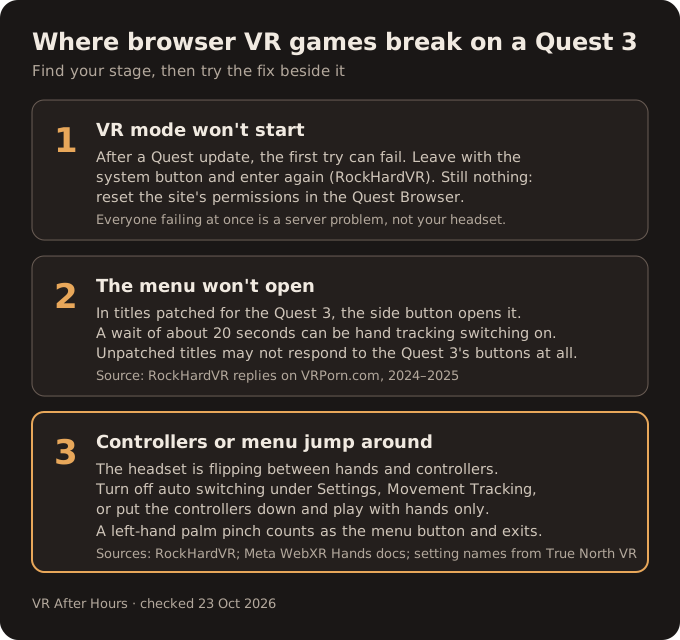
Stage one: the VR button does nothing
The first failure happens before the game has drawn a frame. You press the button to go immersive and stay on the flat page, or the view flickers and returns. RockHardVR explained this on Faye's Elevated Overtime about two years ago: after a recent Quest update, WebXR activation sometimes failed on the first attempt. Leave with the controller's system button, go back in, and it tends to work the second time. In the same thread, VRPorn.com's staff account confirmed the game ran on its own Quest 3.
If a second attempt fails too, the permission the site asked for may have been refused or forgotten. Meta has a help page on per-site permissions in the Quest Browser; we could not get its body to load, so we are not quoting its menu path, and the names in your Browser version are what count. Our RockHardVR fix covers the related case of a black screen and the permissions VRPorn's moderator lists.
One check saves a lot of fiddling. When every browser game fails at once, the cause is on the server. It happened across RockHardVR's catalogue in late 2025. In September 2026 a Quest 3 owner could not stream Flatmates with Benefits; VRPorn.com's staff reproduced it, passed it to the developer and reported it working within about a week. No headset setting would have helped either time; VR pornnow's longer outage is the starkest example.
Stage two: the menu ignores you
RockHardVR's games are built with almost no buttons in the scene. Settings live elsewhere. You reach them through a menu called up by a controller button, which is fine until a new headset maps its buttons differently. That is what the Quest 3 did. On A Succubus' Helping Hand the studio announced its patch. The side button now toggles the menu, which had not worked before, and analog-stick drift was fixed. On Bree's First Class Service it said the same patch was serious business there, because the game has no menu buttons in the world at all.
Two caveats. The patch covers the studio's hand-driven series, which it calls VR Hand Revolution, and titles it explicitly lists for the Quest 3. Older dances and comics whose pages stop at the Quest 2 may not have it. And patches are slow to arrive: the studio wrote on Idol Playroom that builds take a long time to reach VRPorn.com, and that its own site sometimes has newer ones.
The second menu complaint is a delay. A player found that the menu appeared only after putting one controller down, waiting about 20 seconds and picking it up again. RockHardVR replied that the delay most likely comes from hand tracking switching on and pulling the menu to the front. The studio said it needed fixing. As far as the page shows, it still does.
Stage three: the controllers go haywire
This is the most common Quest 3 complaint and the least intuitive. The menu board drifts toward you and away, a controller seems possessed, a pose you held lets go. The studio's diagnosis has been consistent since 2024. The headset keeps switching between hand tracking and the controllers. It is a system behaviour, and the game cannot stop it.
The studio's advice has shifted, and the two versions are not the same thing.
- Earlier, on Helping Hand and Idol Playroom: switch hand tracking off completely in the system settings, or commit to hands and leave the controllers alone.
- Later, on Rising Up With Faye: turn off the automatic switching between hands and controllers.
The second is the better first try, because it keeps hand tracking available for the games designed around it. On current Quest software the switches sit under Settings, Movement Tracking, as auto switch and double-tap switch, according to True North VR's walkthrough for system version 81 and later. Meta's own help article on hand tracking would not render for us, so treat those names as a third-party description of Meta's menus. If you play with hands only, the cleanest setup is the simplest. Put the controllers on the table, out of reach.
One more thing hand players should know. Meta's WebXR Hands documentation reserves a system gesture: a palm-facing pinch on the left hand works like the left controller's menu button and exits the WebXR session. If a game keeps throwing you back to the browser mid-scene, your left hand may be the cause.
What about the Quest 3S?
Most game pages name the Quest 3 and say nothing of the 3S. Players have asked RockHardVR for a 3S update, unanswered on the Bree page. What exists is one data point: during the late-2025 outage, VRPorn.com's moderator relayed the developer's confirmation that Candy's Fitness Fun works on a 3S. Whether the Quest 3 button patch behaves identically on the 3S, no studio has said. Until one does, apply the same three fixes and report what you see.
Our take
None of this makes the browser side of Premium a bad deal. Without a gaming PC, it remains the easiest way into adult VR on a Quest. But the burden of making it work falls on the player more than it should. A one-line note on each RockHardVR page, saying which titles carry the Quest 3 patch and that auto switching should be off, would answer most of the questions in these threads before they are asked. The studio already knows the answers; it has written them in a dozen replies.
If your game is a RockHardVR title, start with Rising Up With Faye or A Succubus' Helping Hand: both are confirmed patched, and our RockHardVR starter guide puts the rest of the catalogue in order. Every browser game, with whether its page names the Quest 3, is listed in our guide to Premium games by headset.
Quick answers
- Why won't VRPorn.com games enter VR on my Quest 3?
- After a system update, WebXR can fail on the first try; RockHardVR's fix is to leave with the system button and enter again. If every game fails, check the comments for a server outage before changing settings.
- How do I open the menu in RockHardVR games on Quest 3?
- Use the side button on titles the studio patched for the Quest 3, such as Bree's First Class Service and the Helping Hand games. A delay of up to about 20 seconds can come from hand tracking starting.
- Why do my controllers go crazy in RockHardVR games?
- The headset keeps switching between hand tracking and controllers. Turn off automatic switching in the Quest settings, or switch hand tracking off, or put the controllers down and use your hands.
- Do these games work on the Quest 3S?
- The studio confirmed Candy's Fitness Fun on the 3S, and players use others on it. Most game pages still name the Quest 3 only, and no studio has issued a separate 3S patch.
- Should I use Chrome or the Quest Browser?
- On a Quest, the Quest Browser. RockHardVR tells players to open the page there. Chrome and Edge are what the game pages suggest for PC headsets, where results are described as hit and miss.
- My Quest 2 controllers vanished after an update. Same problem?
- No. RockHardVR's emergency fix for that Quest 2 issue is to press the system button once and then once more.